
For many overseas Chinese families, the most important part of a TV box is not the processor printed on the specification sheet. It is what happens after the television turns on. Can parents find familiar Chinese programs without jumping between five different services? Can the family watch live television, movies, and sports from the same interface? And if something stops loading, can it be fixed without spending an evening troubleshooting Android? That is where SviCloud TV Boxes and Yogurt TV fit together. The SviCloud 15P TV Box includes access to the SviCloud app ecosystem, and Yogurt TV remains one of the best-known apps inside that environment.
This guide focuses on one thing: SviCloud 15P Yogurt TV. We will look at what the app does, what kind of content it carries, how to install it, whether it needs a password, what to do when it crashes or buffers, and how the experience on the 15P compares with the older SviCloud 10P generation.
What Is Yogurt TV on SviCloud 15P?
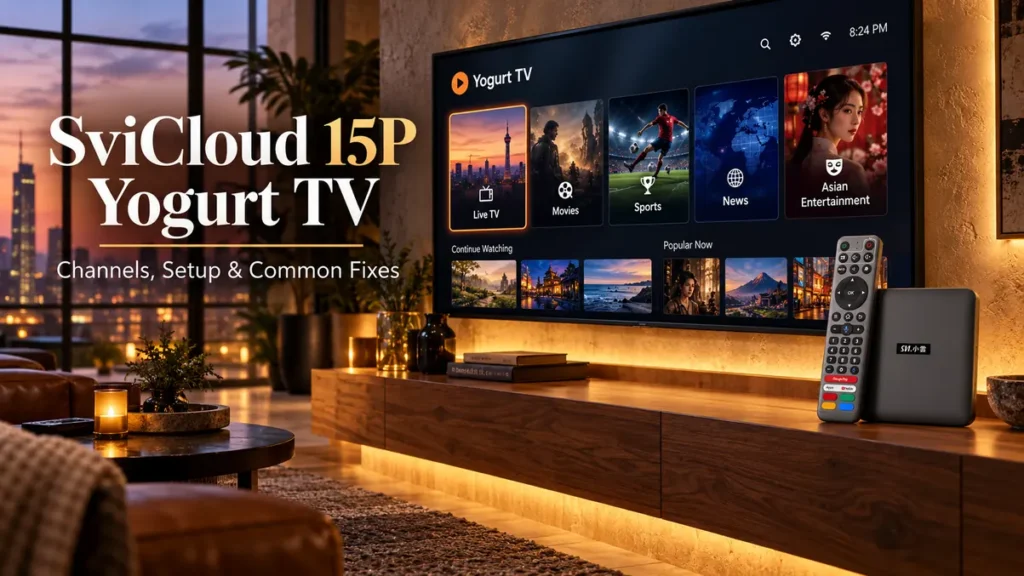
Yogurt TV is one of the core television and video apps used across the SviCloud ecosystem. Think of it as the main entertainment entrance for users who want live television and video content organized by region and category rather than having to build everything from individual Android apps. That distinction is important. A generic Android box may arrive with the operating system and little else. You then spend time finding apps, downloading them, and deciding which service provides which content. The SviCloud approach starts with its own entertainment apps. Yogurt TV is the television-focused part of that experience.
The current SviCloud 15P app lineup includes:
- Yogurt TV for television and general video entertainment
- Yogurt Kids for children’s content
- WeFun for karaoke
- Cherry TV as a separate adult-oriented application
Users can then add compatible Android applications if they want more choices. If you want to see the complete app installation environment rather than Yogurt TV alone, read our SviCloud 15P Apps Guide.
What Can You Watch on Yogurt TV?
Yogurt TV matters to overseas Chinese households because of its regional coverage. Yogurt TV is an entertainment app covering a broad mix of international television and video categories. The available lineup can include content associated with:
- Mainland China
- Hong Kong and Macau
- Taiwan
- Japan and South Korea
- Singapore and Malaysia
- Thailand, Indonesia and the Philippines
- United States and Canada
- Australia and New Zealand
- United Kingdom and parts of Europe
Inside those regional sections, viewers may find live television, news, movies, sports, documentaries, variety programs and general entertainment. This is why people looking for a Chinese TV box often come across SviCloud. An overseas household may want Chinese news in the morning, Hong Kong entertainment after dinner, and a sports program at night. Yogurt TV puts those kinds of categories inside one television-first interface. It is especially convenient for parents or grandparents who would rather use a remote than maintain several separate streaming accounts and apps. Channel lists do change. A channel that appears today may move, be replaced, or temporarily disappear after a future app update. The same is true for movies and on-demand titles. For a broader look at the current entertainment categories, see our SviCloud 15P channel guide.
Does Yogurt TV Include Both Live TV and On-Demand Content?
Yes. The older SviCloud 10P generation already used Yogurt TV as a combined television and video-entertainment environment, and that basic concept continues with the SviCloud 15P. Live television is useful when you want news, sports, or programs that are happening now.
On-demand viewing solves a different problem. Overseas users live in different time zones. A program that airs at a convenient hour in Hong Kong, Taiwan or China may be running in the middle of the night in North America. Having both live and on-demand sections gives families more flexibility. If your main priority is Chinese, Hong Kong, or Taiwanese programming, that combination is one reason SviCloud is frequently considered when people search for the best Chinese TV box.
How to Install Yogurt TV on SviCloud 15P
People searching for how to set up SviCloud 15P often assume Yogurt TV is already sitting on the home screen when the box arrives. Depending on the current software configuration, you may need to download or update the SviCloud entertainment apps first.
The current installation process is straightforward.
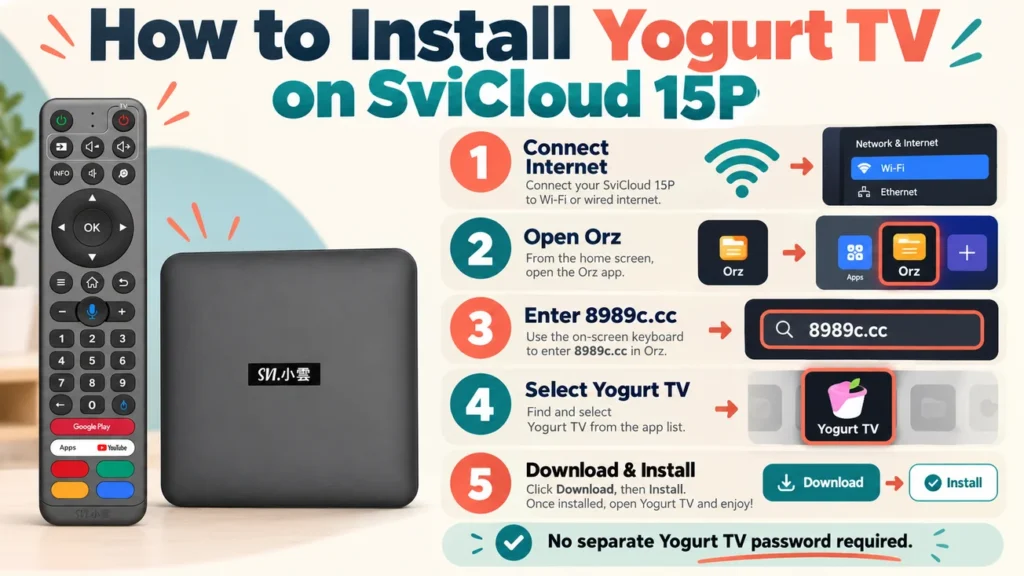
- Connect the SviCloud 15P to the internet through WiFi or Ethernet.
- Return to the SviCloud home interface.
- Open the Orz browser.
- Enter 8989c.cc in the address field.
- Open the SviCloud app download page.
- Select Yogurt TV.
- Choose Download or Install.
- If Android asks for installation permission, follow the on-screen prompt.
- Wait for installation to finish, then open Yogurt TV from the Apps section.
Do not power off the box while an app is installing or updating. For the full hardware-to-app procedure, our SviCloud 15P setup guide covers HDMI, network connection, and initial configuration.
Does Yogurt TV Require a Password?
The SviCloud 15P installation instructions do not list a separate password for opening Yogurt TV. This is sometimes confusing because another SviCloud application, Cherry TV, has historically used password protection because it contains adult-oriented material.
That password should not be confused with Yogurt TV. For a normal Yogurt TV installation, follow the current Orz and 8989c.cc process. If a future version displays an activation or login screen, use the instructions shown by the current SviCloud app source or contact the seller that supplied your box rather than entering passwords found on random forums.
Does Yogurt TV Have a Monthly Subscription?
Current SviCloud documentation treats Yogurt TV as part of the native SviCloud entertainment environment rather than a separate monthly streaming subscription. That does not mean every app you can install on the box is free. Netflix, Disney+, music services, and other third-party platforms operate independently. If a third-party application requires a paid membership, you still need the appropriate account.
SviCloud 15P Yogurt TV vs SviCloud 10P Yogurt TV
If you have used SviCloud before, Yogurt TV on the 15P will feel familiar. The basic idea has not been reinvented. Both generations use Yogurt TV as a central television and video application.
The difference is the hardware underneath it.
| Feature | SviCloud 10P Generation | SviCloud 15P |
|---|---|---|
| Android Platform | Android 12 | Android 14 |
| Processor Platform | Cortex-A35 generation | 64-bit A55-based platform |
| Memory | 4GB | 4GB |
| Storage | 64GB | 64GB |
| Wireless | Dual-band wireless | WiFi 6 2T2R |
| Bluetooth | Bluetooth 5.0 | Bluetooth 5.4 |
For Yogurt TV users, the practical benefit is not that every channel suddenly changes. The newer 15P platform gives the app a more current Android base, faster hardware, and updated wireless connectivity. Menus can feel more responsive, and app launches benefit from the newer platform. The current Yogurt TV catalog may also evolve as SviCloud updates its entertainment service, but exact channel and title counts should never be treated as permanent. If you still own an older model, our SviCloud 10P Apps Guide is useful for comparing the earlier app environment. For the broader hardware upgrade, the SviCloud 15P review explains what changed beyond Yogurt TV.
Common Yogurt TV Problems and How to Fix Them
Yogurt TV is still an Android application, which means the same basic problems that affect other streaming apps can occasionally appear here too.
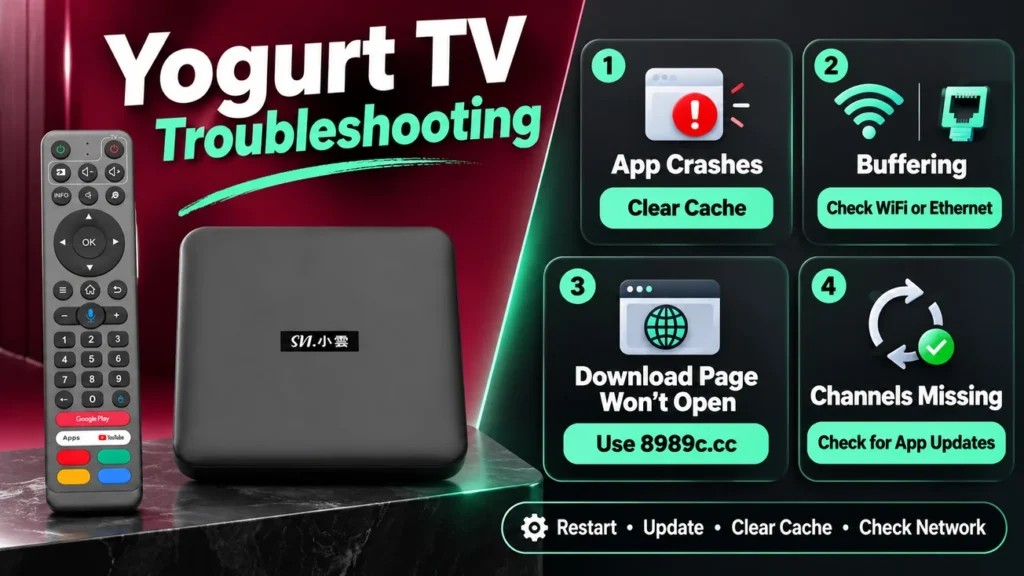
Yogurt TV Opens and Immediately Crashes
Start by clearing the app cache rather than deleting the app. Temporary cache files can become corrupted after updates or long periods of use. Google recommends clearing an application’s cache as one of the standard troubleshooting steps when video apps stop behaving normally.
On Android-based TV devices, the usual route is:
Settings → Apps → Yogurt TV → Storage / Cache → Clear Cache
Depending on the current Yogurt TV interface, you may also find a Clear Cache option from the app’s own menu.
The Yogurt TV Download Page Will Not Open
Older SviCloud instructions sometimes referenced different download addresses. The current SviCloud 15P guide uses: 8989c.cc. If you find an old tutorial pointing to another address, use the current SviCloud installation source instead. Also check whether Orz itself can open another webpage. If nothing loads, the problem is probably the network connection rather than the Yogurt TV page.
Why Does My TV Keep Buffering?
A buffering problem does not automatically mean Yogurt TV is broken. Live television depends on your home network and the stream source at the same time. Weak WiFi, evening congestion, a distant router, or a busy content server can all cause interruptions. If you are wondering why does my TV keep buffering, test another Yogurt TV channel and then try another app. If every app buffers, investigate your home network. If only one stream has a problem, the source itself may be temporarily busy.
How to Fix Buffering on Yogurt TV
When people search for how to fix buffering, they often jump straight to reinstalling the app. That should not be the first step.
Try these instead:
- Restart the SviCloud 15P.
- Restart your router.
- Use the 5GHz WiFi band when the router is nearby.
- Move the router closer to the television if the signal is weak.
- Try Ethernet for a more consistent local connection.
- Close unused background apps.
- Update Yogurt TV if a newer build is available.
- Clear the Yogurt TV cache.
Yogurt TV Is Installed but Some Channels Are Missing
First, check whether the app needs an update. Channel and content lists change over time. A missing channel does not necessarily mean there is something wrong with the SviCloud 15P. Return to Orz, open 8989c.cc, and confirm that you are using the current Yogurt TV version. If the entire box is behaving abnormally rather than Yogurt TV alone, our SviCloud TV Box troubleshooting guide covers wider system problems.
Other Apps That Make SviCloud 15P More Useful
Yogurt TV may be the headline app, but the SviCloud 15P TV Box is more useful because it does not depend on a single application. Yogurt Kids provides a separate children’s environment. WeFun adds karaoke for family use. Cherry TV is a separate 18+ application and should be protected appropriately in households with children. Android 14 also allows compatible third-party software to be added when needed. That could mean video platforms, music apps, media players, browsers, or utility apps. The built-in SviCloud environment comes first; Android gives you room to expand it.
Who Should Buy SviCloud 15P?
People searching for who should buy SviCloud 15P usually fall into one of a few groups. It makes the most sense for overseas Chinese households that watch Asian television regularly, not just once in a while. It is also a good fit for families that want one remote-driven entertainment device for parents, children, and younger users rather than maintaining several streaming sticks and separate interfaces. Someone who only watches one mainstream subscription app may not need a specialized Xiaoyun TV Box. Someone who wants Chinese television, international channels, VOD, karaoke and Android apps from one television setup will get far more value from it.
Where to Buy a Genuine SviCloud 15P
Search results for SviCloud contain many stores, marketplace listings, and similarly named products. Price alone is not enough to tell whether a seller is reliable. Before buying, check the exact model, warranty terms, return policy, and whether the seller can help if Yogurt TV or the hardware needs support later. Our guide on how to buy a genuine SviCloud TV Box explains what to verify before paying an unfamiliar seller. For customers looking for a SviCloud 15P official store or planning to buy SviCloud 15P in the USA or Canada, svicloudtv.com is currently an authorized SviCloud seller serving the US and Canada.
Current store benefits include genuine products, tracked delivery, a 30-day return window for eligible orders, one-year warranty support under the applicable store terms, and pre-sale and after-sales assistance. US and Canada delivery is currently estimated at approximately 2–5 business days. Buyers outside those markets should confirm current shipping availability and delivery terms before checkout.
SviCloud 15P Price and Current Discount
The SviCloud 15P price can change when a promotion is running, so the live product page is more useful than an old screenshot or marketplace listing. There is currently a SviCloud 15P sale on our store.
Enter coupon code svi8 at checkout to receive 8% OFF.
Ready to Check the Current SviCloud 15P Offer?
View the latest SviCloud 15P package, current availability, and sale details.
Use coupon code svi8 at checkout for 8% OFF.
Final Thoughts: Yogurt TV Is the App That Explains the SviCloud Experience
Yogurt TV is not the only reason to buy a SviCloud TV Box, but it explains why the product is different from a generic Android box. Instead of starting with an empty home screen and building the entertainment experience yourself, SviCloud gives users a core television app designed around live TV, international regions, and on-demand viewing. The SviCloud 15P keeps that familiar Yogurt TV concept while moving it onto a newer Android 14, A55-based and WiFi 6 platform. For overseas Chinese families, that combination makes more sense than judging the device only by RAM, storage or a long specification list.
Browse the SviCloud TV Box collection to compare current models, or visit the SviCloud 15P product page for the latest price, package, and availability.